
WiFi Security Dropouts? We'll Find the Weak Spot in Your Home in Wolverhampton
We measure signal where your cameras and sensors actually sit, then fix placement, band and range issues.
Booking fee plus hourly labour — the price is confirmed before any work starts.
What this costs
| Booked 14+ days ahead | £25 booking fee £85 per hour |
|---|---|
| Booked within 48 hours | £100 booking fee £65 per hour |
| Same-day call-out | £220 booking fee £45 per hour |
The booking fee secures the visit. Labour is then charged by the hour, so you only pay for the time the job actually takes.
Booking fee £25–£220
£25 + £85/hr booked 14+ days ahead, £100 + £65/hr inside 48 hours, £220 + £45/hr same day. Agreed before we arrive.
Covered under Smart Security
Security & CCTV › Smart Security — one of 20 documented jobs in this section.
Same-day wifi smart security dropouts
Urgent jobs can often be booked for today. Ask when you book and we will confirm the slot before you pay anything.
15 service areas
Birmingham, Coventry, Dorridge and 12 more across the West Midlands.
WiFi that works for browsing and WiFi that works for a security device are not the same thing. Streaming a film buffers gracefully; a camera or sensor that loses its connection for thirty seconds is, from your system's point of view, offline. Dropouts therefore show up on security kit long before they annoy you on a laptop, and the usual causes are signal coverage, wireless congestion, band mismatch and power or battery problems.
Why security devices drop out
Signal is the big one. Cameras and hubs are often placed at the edges of the home — a front door camera, a garage sensor, a hub tucked in a cupboard — precisely where WiFi is weakest, and thick walls, foil-backed insulation and large metal appliances all eat signal. Congestion is the second cause: a busy wireless environment from neighbours' networks can interfere, especially on crowded channels. Band mismatch matters too, because many security devices only work on the 2.4GHz band, which has better range but can be crowded and occasionally misconfigured. And a battery on its way out produces exactly the same symptoms as weak signal, so it must be ruled out before blaming the network.
Measuring before fixing
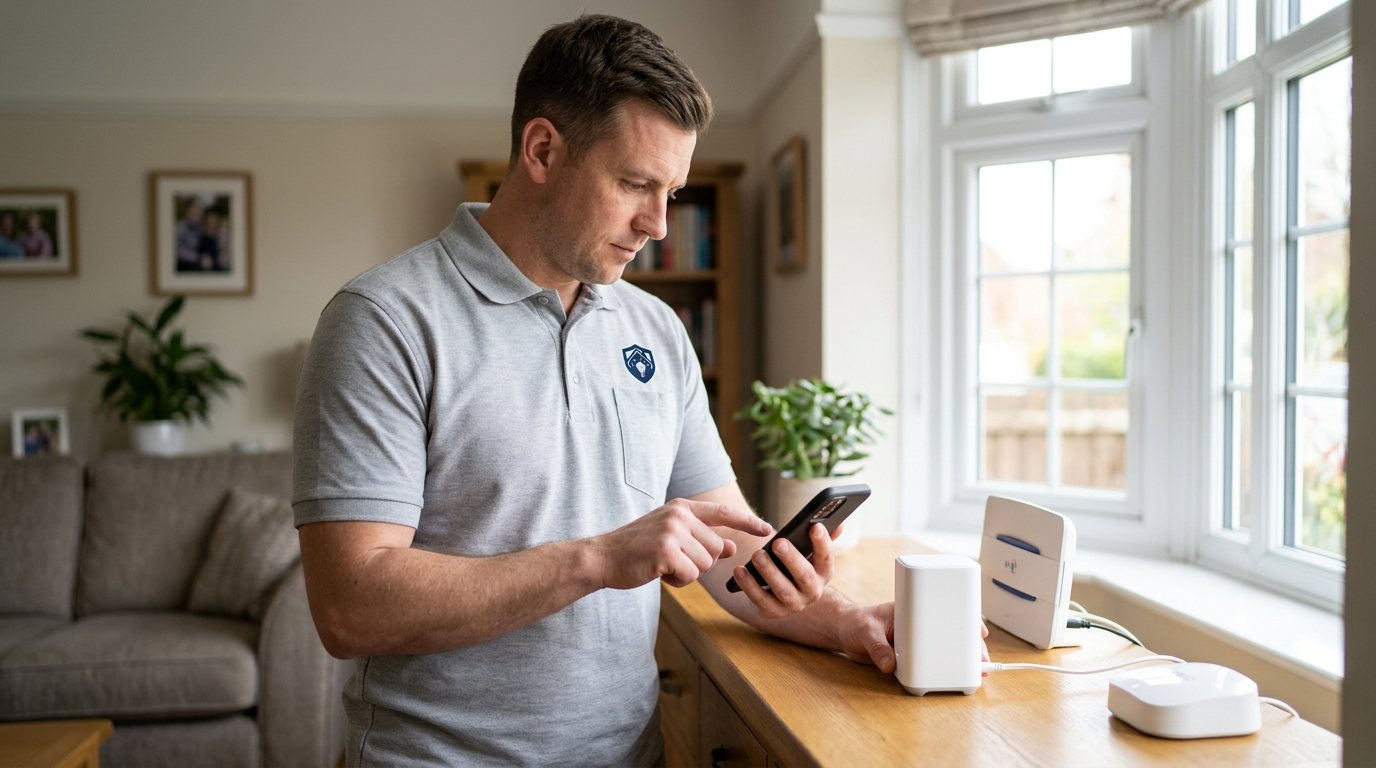
We bring proper measurement to the visit. We check signal strength at each device's mounting position, identify which band each device is using, and look at how your router is configured — whether bands are separated or merged, whether channel choice is sensible, and whether any settings are isolating devices from each other. We also check each device's power situation, because a camera rebooting on a poor power supply looks identical to one with WiFi trouble.
The fixes that actually work
The most effective fixes are often the simplest: moving a hub a metre or two out of a cupboard, repositioning a camera a short distance to the far side of a wall, or separating your router's bands so 2.4GHz devices get a clear, stable network. Where genuine coverage gaps exist, we will discuss options honestly — router relocation, a properly configured extender or mesh node — and quote any additional equipment separately for your approval. We do not sell kit for the sake of it; if a reposition solves it, that is what we recommend.
Honest limits
We cannot guarantee your WiFi never drops again, because your router, your broadband provider and the wireless environment around your home are all outside our control. What we can do is configure your system sensibly within those limits and tell you plainly where any residual weakness lies. We also will not advise turning off encryption or WPS-style shortcuts to chase a stable connection — a reliable but unsecured network is not a trade we recommend.
Aftercare
Once the dropouts are resolved, keep an eye on the app's device status for a week or two. If one specific device is still the weak link, that points at the device or its battery rather than the network, and it is better to replace a failing sensor before it fails at the wrong moment. If dropouts return after a router change or a provider swap, tell us — new routers often need the system reconfigured to match.
Booking
Book via the Maintenance Men website or by phone, and mention how many devices are affected, whether dropouts happen at particular times, and where your router and hub sit. Photos of the hub's location and a note of your router model help us prepare before we arrive.
When the problem is the router, not the devices
Sometimes the devices are fine and the router is the constraint. Routers that are several years old, have been overloaded with smart-home gadgets, or run firmware that has never been updated can struggle to keep many devices connected at once. We will tell you if the router itself looks like the bottleneck, and what the realistic options are — from configuration changes we can make on the day to a router replacement that is your decision to make with your provider or retailer. What we will not do is recommend you disable security features, such as encryption or device authentication, to squeeze out a more stable connection; a network that is reliable but unsecured is a poor trade for a security system, and we will always look for a fix that improves things without lowering your protection.
How the price works
We charge a booking fee to hold your slot, then an hourly rate for the work itself. The fee changes with how soon you need us; the hourly rate changes with the slot you choose. You approve the price before we start, so there is no surprise on the invoice.
Booked 14+ days ahead
£25 booking fee
then £85 per hour of labour
Best value. Book the slot now, pay the smallest booking fee.
Booked within 48 hours
£100 booking fee
then £65 per hour of labour
For jobs that can wait a day or two but not a fortnight.
Same-day call-out
£220 booking fee
then £45 per hour of labour
Urgent problems: standing water, no heat, no power, leaks.
Book the slot
Choose the window that suits you and pay the booking fee. That holds your place in the diary.
We diagnose on site
The engineer confirms the cause and tells you what the job involves and how long it should take.
You approve, we work
Nothing goes ahead until you agree the price. Labour is then charged per hour at your slot rate.
A security camera that drops off the WiFi every evening, a sensor that goes quiet for hours at a time, an app full of 'device offline' warnings — dropouts are annoying, and worse, they leave gaps in your coverage exactly when you are not looking. The good news is that dropouts usually have a physical, measurable cause. Our visit is about evidence: we test signal strength where each device actually lives, not where your phone happens to work, and we fix what the evidence shows.
What our customers say about our Security & CCTV service
5 out of 5 from 7 reviews
Would use again
Third time we have used Maintenance Men, and the same experience each time: agreed price, proper explanation, job done in one visit. The hourly rate is fair for the standard of work.
Job: CCTV Installation
Second time we have used them
I had put off sorting this for months because I expected a runaround. Quoted the booking fee plus hourly rate upfront, stuck to it, and actually found the underlying cause rather than just clearing the symptom. Worked neatly and hoovered up afterwards.
Job: Backup Battery Fault
Exactly what was quoted
What I appreciated was being told what was actually wrong before anyone started. Sorted in under 56 minutes and the invoice matched the quote to the penny.
Job: Alarm Repair Service
Book WiFi Smart Security Dropouts
Tell us what is happening and choose a slot. If you are not sure this is the right job, use the diagnosis panel — it narrows the problem down before you book.
- Booking fee confirmed up front
- Hourly labour, agreed before work starts
- Same-day slots for urgent problems



Questions people ask about wifi smart security dropouts
Straight answers to the things customers ask most often before booking.
Could weak batteries cause WiFi dropouts?
Yes, and it is one of the most common causes. A battery sagging below its operating threshold makes a sensor drop off the network intermittently, which looks exactly like a signal problem. We test the power situation first so you do not pay for network fixes the devices do not need.
What do you measure during the visit?
We measure WiFi signal strength at each camera, sensor and hub position, check which band each device is using, review your router's configuration, and verify each device's power supply. The aim is to find the actual weak spot rather than guessing from the sofa.
Is there a security risk in how dropouts get fixed?
Some quick fixes circulating online — disabling encryption, enabling WPS, turning off authentication — make the network less secure, and we will not suggest them. Proper fixes improve signal or configuration without weakening anything, and we will explain any trade-offs honestly.
Do I need mesh WiFi or extenders to fix this?
Sometimes, but far less often than people assume. Repositioning a hub or separating router bands solves a surprising share of dropout problems. Where a genuine coverage gap exists, we will explain the options and quote any equipment separately, so you decide with the full picture.
What does the visit cost?
You pay a booking fee when you book, and labour is charged hourly at a rate that depends on how soon you need the visit. The full cost of the work is quoted and approved by you before we start, with any parts quoted separately. That way there are no surprises on the day.
Need wifi smart security dropouts sorted in Wolverhampton?
Book a slot in the diary and pay only the booking fee up front. We confirm the rest before we start.