
WiFi Camera Dropouts Traced and Fixed, Not Just Rebooted in Dorridge
We measure your wireless signal where the cameras actually are and fix the coverage, interference and placement causes.
Booking fee plus hourly labour — the price is confirmed before any work starts.
What this costs
| Booked 14+ days ahead | £25 booking fee £85 per hour |
|---|---|
| Booked within 48 hours | £100 booking fee £65 per hour |
| Same-day call-out | £220 booking fee £45 per hour |
The booking fee secures the visit. Labour is then charged by the hour, so you only pay for the time the job actually takes.
Booking fee £25–£220
£25 + £85/hr booked 14+ days ahead, £100 + £65/hr inside 48 hours, £220 + £45/hr same day. Agreed before we arrive.
Covered under CCTV Systems
Security & CCTV › CCTV Systems — one of 20 documented jobs in this section.
Same-day WiFi CCTV Signal Loss
Urgent jobs can often be booked for today. Ask when you book and we will confirm the slot before you pay anything.
15 service areas
Birmingham, Coventry, Dorridge and 12 more across the West Midlands.
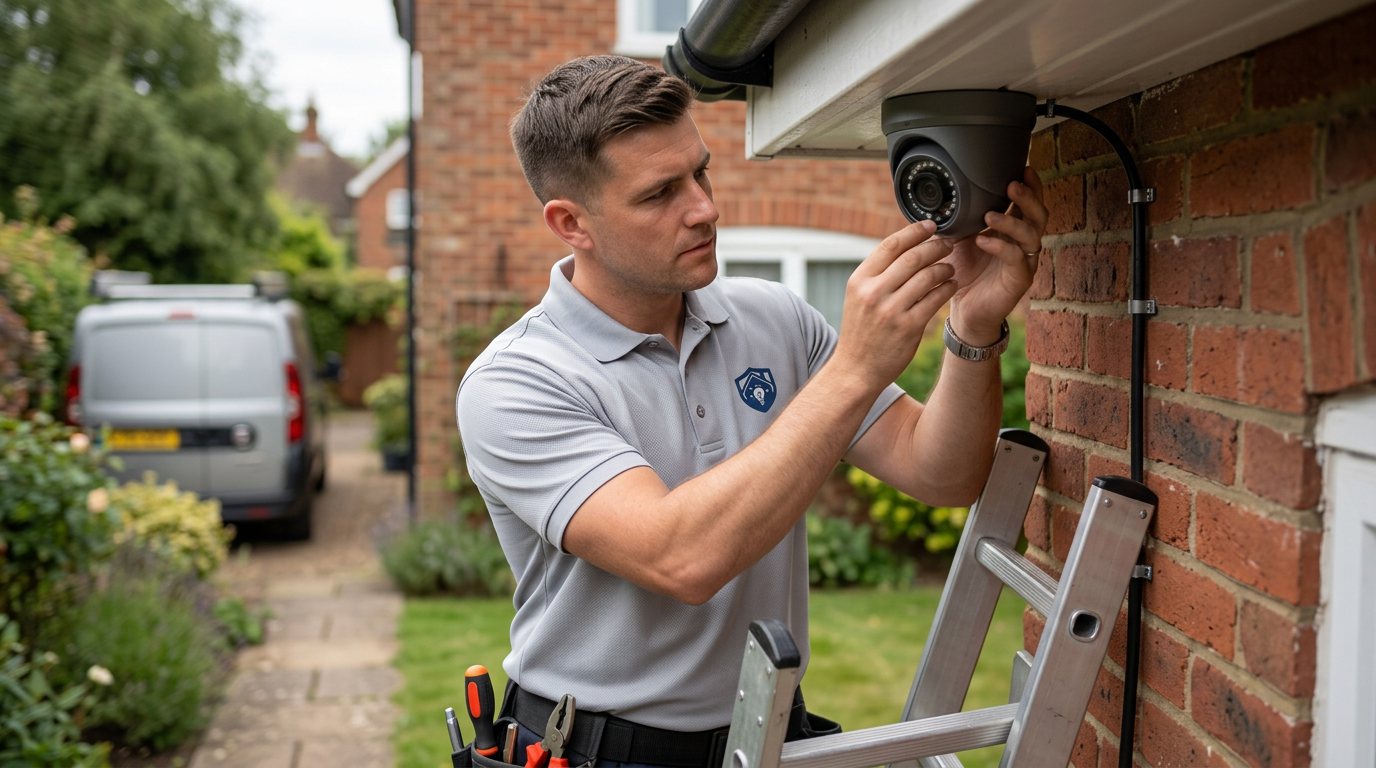
WiFi-connected cameras promise a simple installation and then deliver a familiar frustration: the picture freezes, the camera drops offline, it reconnects when you reboot the router, and the cycle repeats. The instinct is to blame the camera, but in our experience the camera is usually innocent. Wireless CCTV faults are almost always about the radio environment — signal strength at the camera's position, interference from other devices, and the physics of walls, floors and distance — and they are fixable once measured properly.
Why wireless cameras lose their connection
Distance and building construction are the starting point: every wall, floor and large appliance between the router and a camera weakens the signal, and a camera mounted at the far end of the house or in an outbuilding may be running on fumes from day one. Interference competes for the same air — neighbouring networks, Bluetooth devices, baby monitors, microwaves and other equipment all add noise, and channel congestion in built-up areas is real. Band matters too: cameras connected to a crowded or distant band can struggle where the other band would serve them better. Router placement is a frequent culprit, with equipment tucked in a corner, behind a TV or inside a cabinet. Equipment faults exist — a failing antenna, a camera with a weak radio, or a router past its best — but they are the minority, not the majority.
How we diagnose it properly
Guessing is the enemy of fixing WiFi faults, so we measure. Our engineer tests the actual signal strength and quality at each camera's position, identifies which band each camera is using and how congested the local channels are, and watches a live connection while the system runs to see how it behaves under real conditions. We check the router's placement and condition, the camera firmware and settings, and whether dropouts correlate with anything specific — time of day, a device being used, a door closing. We also confirm whether the cameras are stable on the local network and only failing on remote access, since those are different problems with different fixes.
Fixes that hold
The repairs depend on the measurement. Moving the router a few metres can transform coverage; selecting the right band and channel for each camera reduces interference; adding a network point, access point or booster in the right place resolves a weak-spot camera far more reliably than a generic extender plonked halfway. Where a camera is genuinely marginal in its position, we will say so and discuss whether repositioning, a wired connection or a different camera is the honest answer — a wired connection, where feasible, is always the most dependable option for security cameras. Parts and any new cabling are quoted separately before fitting. What we cannot guarantee is your WiFi environment staying the same forever: neighbours add networks, devices change, and wireless is inherently less stable than cable. We will configure things as robustly as possible and be honest about that trade-off.
Wireless systems and responsible recording
Wireless convenience does not change your responsibilities as the system owner. Recordings are personal data and must be handled lawfully and considerately — cameras should cover your own property, avoid unnecessarily filming neighbours' homes, gardens or public space, footage should be retained for a sensible period, and clips shared only appropriately, for example with the police if they request them. WiFi footage also often flows through apps and cloud services, which we cannot guarantee the availability of; your local recording remains the dependable baseline. We configure equipment; we do not provide legal advice.
Aftercare
After the fix, watch the cameras over the first week and note any dropout patterns — time of day or specific activity is useful diagnostic information. If you upgrade your router or broadband later, expect the wireless setup to need revisiting. Keep the router's placement sensible: new furniture and cabinets have a habit of creeping in front of antennas.
When to call us
Book when dropouts recur rather than tolerating them, and tell us how many cameras are affected, whether it happens at particular times, and where your router sits. You pay a booking fee when you book, labour is charged hourly at a rate that depends on how soon you need the visit, and the full cost is quoted and approved before work starts, with parts quoted separately.
How the price works
We charge a booking fee to hold your slot, then an hourly rate for the work itself. The fee changes with how soon you need us; the hourly rate changes with the slot you choose. You approve the price before we start, so there is no surprise on the invoice.
Booked 14+ days ahead
£25 booking fee
then £85 per hour of labour
Best value. Book the slot now, pay the smallest booking fee.
Booked within 48 hours
£100 booking fee
then £65 per hour of labour
For jobs that can wait a day or two but not a fortnight.
Same-day call-out
£220 booking fee
then £45 per hour of labour
Urgent problems: standing water, no heat, no power, leaks.
Book the slot
Choose the window that suits you and pay the booking fee. That holds your place in the diary.
We diagnose on site
The engineer confirms the cause and tells you what the job involves and how long it should take.
You approve, we work
Nothing goes ahead until you agree the price. Labour is then charged per hour at your slot rate.
Wireless cameras are convenient until the signal starts dropping, and then they are the most temperamental part of any security setup. WiFi problems for CCTV are about signal strength, interference and placement far more than about the cameras themselves. Our engineer measures what is actually happening at each camera's position and fixes the cause rather than restarting the router again.
What our customers say about our Security & CCTV service
5 out of 5 from 7 reviews
Would use again
Third time we have used Maintenance Men, and the same experience each time: agreed price, proper explanation, job done in one visit. The hourly rate is fair for the standard of work.
Job: CCTV Installation
Second time we have used them
I had put off sorting this for months because I expected a runaround. Quoted the booking fee plus hourly rate upfront, stuck to it, and actually found the underlying cause rather than just clearing the symptom. Worked neatly and hoovered up afterwards.
Job: Backup Battery Fault
Exactly what was quoted
What I appreciated was being told what was actually wrong before anyone started. Sorted in under 56 minutes and the invoice matched the quote to the penny.
Job: Alarm Repair Service
Book WiFi CCTV Signal Loss
Tell us what is happening and choose a slot. If you are not sure this is the right job, use the diagnosis panel — it narrows the problem down before you book.
- Booking fee confirmed up front
- Hourly labour, agreed before work starts
- Same-day slots for urgent problems



Questions people ask about wifi cctv signal loss
Straight answers to the things customers ask most often before booking.
Should I just buy a WiFi booster and see if it helps?
A booster placed without measurement often makes things worse or fixes nothing, because the problem may be interference, band choice or router placement rather than raw range. We measure the actual signal at each camera's position first, then recommend the right fix — which is sometimes much cheaper than a booster.
What do you actually measure on a WiFi CCTV visit?
We test signal strength and quality at each camera's position, identify the band and channel congestion in your area, watch live connections under real conditions, and check router placement and camera settings. That tells us whether the fix is coverage, interference, configuration or the camera itself.
Would wired cameras be better than wireless?
For dependability, yes — a wired connection is inherently more stable than any wireless link, which is why many security installations mix both. If one camera's position is genuinely marginal, we will discuss wiring, repositioning or camera options honestly and quote whatever work you approve before starting.
Can you guarantee my cameras will never drop out again?
No, and we would be misleading you if we promised that — wireless depends on your home's construction, your neighbours' networks and your broadband, none of which stay constant. What we do is measure, configure and fix the causes we find, and tell you plainly what is and is not within anyone's control.
How is the cost worked out?
You pay a booking fee when you book. Labour is charged hourly at a rate that depends on how soon you need the visit. The full cost is quoted and approved before work starts; parts are quoted separately.
Need wifi cctv signal loss sorted in Dorridge?
Book a slot in the diary and pay only the booking fee up front. We confirm the rest before we start.